Powrót   Forum CDRinfo.pl > Napędy optyczne i nagrywanie CD, DVD, Blu-ray, HD DVD > Flashowanie/Firmware/Podkręcanie napędów optycznych

Flashowanie/Firmware/Podkręcanie napędów optycznych Tematy poświęcone modyfikacjom biosów i nagrywarek


Witaj Nieznajomy! Zaloguj się lub Zarejestruj

Zarejestrowani użytkownicy mają dostęp do dodatkowych opcji, lepszej wyszukiwarki oraz mniejszej ilości reklam. Rejestracja jest całkowicie darmowa!

Odpowiedz na post
 
Opcje związane z dyskusją Tryby wyświetlania
Stary 11.09.2024, 01:20   #1
jadburner
Moderator
 
Avatar użytkownika jadburner
 
Data rejestracji: 07.03.2017
Lokalizacja: Middle Earth
Posty: 10,035
jadburner ma doskonałą reputację, jest przykładem osoby znającej się na rzeczy <2000 i więcej pkt>jadburner ma doskonałą reputację, jest przykładem osoby znającej się na rzeczy <2000 i więcej pkt>jadburner ma doskonałą reputację, jest przykładem osoby znającej się na rzeczy <2000 i więcej pkt>jadburner ma doskonałą reputację, jest przykładem osoby znającej się na rzeczy <2000 i więcej pkt>jadburner ma doskonałą reputację, jest przykładem osoby znającej się na rzeczy <2000 i więcej pkt>jadburner ma doskonałą reputację, jest przykładem osoby znającej się na rzeczy <2000 i więcej pkt>jadburner ma doskonałą reputację, jest przykładem osoby znającej się na rzeczy <2000 i więcej pkt>jadburner ma doskonałą reputację, jest przykładem osoby znającej się na rzeczy <2000 i więcej pkt>jadburner ma doskonałą reputację, jest przykładem osoby znającej się na rzeczy <2000 i więcej pkt>jadburner ma doskonałą reputację, jest przykładem osoby znającej się na rzeczy <2000 i więcej pkt>jadburner ma doskonałą reputację, jest przykładem osoby znającej się na rzeczy <2000 i więcej pkt>
Flash WH16NS58 to Enable UHD Disc Quality Scanning

The WH16NS58 is one of the very few options currently available for checking the quality of single and double layer burned discs. With the right firmware, you can also enable scanning of UHD burned discs. Unfortunately, the drive is now sold with firmware (1.V5, 1.V7. 1.V8, 1.V9) that disables UHD. Here we show how to flash UHD-enabled firmware to the drive.

You will need the following for this to work:
  • You must have MakeMKV installed.
  • The "MK" custom firmware pack with LibreDrive patches (link)
  • The SDFtool flasher (link)
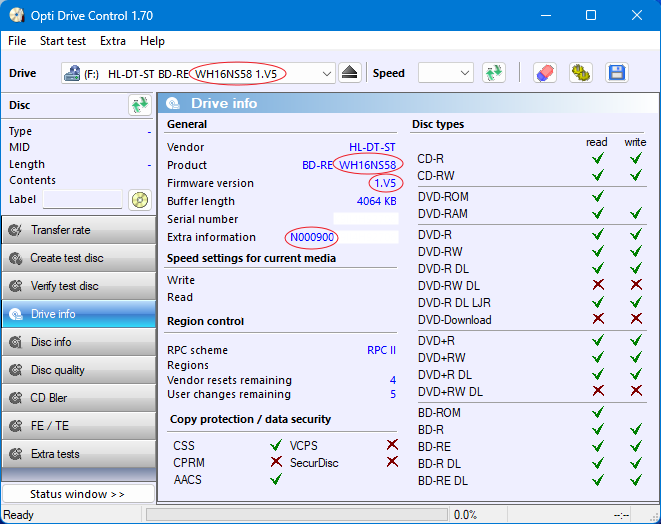
I'll be flashing the following drive with UHD-disabled 1.V5 firmware:

Flash WH16NS58 to Enable UHD Disc Quality Scanning-step-0-before-.png

Here's the step by step procedure:
  • Run the SDFtool flasher and select your drive.
Flash WH16NS58 to Enable UHD Disc Quality Scanning-step-1.png
  • In the lower drop-down box, select the MK version of the WH16NS60 1.03 firmware to write to the drive. Why the WH16NS60 firmware? For some unknown reason the SDFtool flasher is not able to directly flash the UHD-enabled 1.V5 firmware to the drive. So, this intermediate step is necessary.
Flash WH16NS58 to Enable UHD Disc Quality Scanning-step-2.png
  • Click the START button to start the flashing process.
Flash WH16NS58 to Enable UHD Disc Quality Scanning-step-3.png
  • When the flashing completes, the drive will now have the WH16NS60 1.03 "MK" firmware.
Flash WH16NS58 to Enable UHD Disc Quality Scanning-step-4-after-flash-wh16ns60-.png
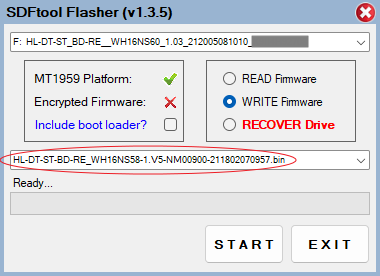
  • Run the SDFtool flasher again, select the drive (which now has the WH16NS60 1.03 "MK" firmware), and in the lower drop-down box select the WH16NS58 1.V5 "MK" firmware.
Flash WH16NS58 to Enable UHD Disc Quality Scanning-step-5-select-wh16ns58-fw-flash-.png
  • Click the START button to start the flashing process.
Flash WH16NS58 to Enable UHD Disc Quality Scanning-step-6-during-final-flash-.png

When the flashing is done, the drive will now have the UHD-enabled WH16NS58 1.V5 firmware.

Flash WH16NS58 to Enable UHD Disc Quality Scanning-step-7-after-.png

Ostatnio zmieniany przez jadburner : 11.09.2024 o godz. 01:29
jadburner jest offline   Odpowiedz cytując ten post

  #ads
CDRinfo.pl
Reklamowiec


Data rejestracji: 29.12.2008
Lokalizacja: Sieć globalna
Wiek: 31
Posty: 1227
 

CDRinfo.pl is online  
Stary 11.09.2024, 01:22   #2
jadburner
Moderator
 
Avatar użytkownika jadburner
 
Data rejestracji: 07.03.2017
Lokalizacja: Middle Earth
Posty: 10,035
jadburner ma doskonałą reputację, jest przykładem osoby znającej się na rzeczy <2000 i więcej pkt>jadburner ma doskonałą reputację, jest przykładem osoby znającej się na rzeczy <2000 i więcej pkt>jadburner ma doskonałą reputację, jest przykładem osoby znającej się na rzeczy <2000 i więcej pkt>jadburner ma doskonałą reputację, jest przykładem osoby znającej się na rzeczy <2000 i więcej pkt>jadburner ma doskonałą reputację, jest przykładem osoby znającej się na rzeczy <2000 i więcej pkt>jadburner ma doskonałą reputację, jest przykładem osoby znającej się na rzeczy <2000 i więcej pkt>jadburner ma doskonałą reputację, jest przykładem osoby znającej się na rzeczy <2000 i więcej pkt>jadburner ma doskonałą reputację, jest przykładem osoby znającej się na rzeczy <2000 i więcej pkt>jadburner ma doskonałą reputację, jest przykładem osoby znającej się na rzeczy <2000 i więcej pkt>jadburner ma doskonałą reputację, jest przykładem osoby znającej się na rzeczy <2000 i więcej pkt>jadburner ma doskonałą reputację, jest przykładem osoby znającej się na rzeczy <2000 i więcej pkt>
I've tested this procedure with UHD-disabled 1.V5 and 1.V8 firmware. It should work with 1.V7 firmware. I do not have a WH16NS58 with the latest 1.V9 firmware, so I'm unable to test it. If someone has that firmware and can test the above procedure with it, please let us know if it works.
jadburner jest offline   Odpowiedz cytując ten post
Stary 16.09.2024, 12:05   #3
Coopervid
Zarejestrowany
 
Avatar użytkownika Coopervid
 
Data rejestracji: 04.09.2024
Posty: 53
Coopervid w tym momencie nie ma Reputacji dodatnich ani ujemnych <0  pkt>
As a side note: Everybody with a full size LG / ASUS drive with the MT1959 chip can flash the LG BH16NS58 1.V5 firmware and do quality checks. It doesn't have to be a LGBH16NS58 drive to start with. Software for quality checks: Google "qpxtool" and find 0.8.1. patchlevel 4 on Github.
Coopervid jest offline   Odpowiedz cytując ten post
Stary 16.09.2024, 22:40   #4
Coopervid
Zarejestrowany
 
Avatar użytkownika Coopervid
 
Data rejestracji: 04.09.2024
Posty: 53
Coopervid w tym momencie nie ma Reputacji dodatnich ani ujemnych <0  pkt>
Another hint: Don't scan faster than 4x. 4x is the maximum speed a drive is doing playing back UHDs. The error correction will work for up to LDC 1500 / BIS 20 to 30. Faster scans will report higher numbers but this is suggesting your burn is bad. 4x is practically the highest speed needed to have playbacks without issues. Therefore faster scans report issues that are suggesting issues which are none. Your burn with the max LDC / BIS numbers listed above will play fine when scanned with 4x.
Coopervid jest offline   Odpowiedz cytując ten post
Stary 23.11.2025, 01:10   #5
cederom
Zarejestrowany
 
Data rejestracji: 03.11.2025
Lokalizacja: waw
Posty: 2
cederom w tym momencie nie ma Reputacji dodatnich ani ujemnych <0  pkt>
I just did a successful crossflash of ASUS BW-16D1HT 3.10 to LG WH16NS60 1.03 firmware from the MakeMKV firmware package using SDFTool 1.3.6 :-)

This firmware fixes issues of ASUS stock firmware (i.e. not writing some disks, hanging the controller, etc), sleep bug, and opens door for disks not supported to write before (i.e. I could only write to RITEK/DR3 aka TDK BD-R DL 50GB on Pioneer now ASUS/LG writes too)!

SDFTool is awesome because it allows crossflashing even encrypted burners and rollback / rescue broken drives, works out of the box on 64-bit OS, supports all sorts of drives.. and is not detected as malware unlike most other tools ;-)

After flashing power off / on is required, then old ASUS BW-16D1HT 3.10 reports as HL-DT-ST BD-RE WH16NS60 1.03 :-)

Big Thank You @jadburner and @czary2mary !! Good to see someone still cares about CeDeROMs

Cytat:
% cdrecord dev=9,0,0 -prcap
Cdrecord-ProDVD-ProBD-Clone 3.02 2024/03/18 (amd64-unknown-freebsd14.3) Copyright (C) 1995-2019 Joerg Schilling
scsidev: '9,0,0'
scsibus: 9 target: 0 lun: 0
Using libscg version 'schily-0.9'.
Device type : Removable CD-ROM
Version : 0
Response Format: 2
Capabilities :
Vendor_info : 'HL-DT-ST'
Identifikation : 'BD-RE WH16NS60 '
Revision : '1.03'
Device seems to be: Generic mmc2 DVD-R/DVD-RW/DVD-RAM.

Drive capabilities, per MMC-3 page 2A:

Does read CD-R media
Does write CD-R media
Does read CD-RW media
Does write CD-RW media
Does read DVD-ROM media
Does read DVD-R media
Does write DVD-R media
Does read DVD-RAM media
Does write DVD-RAM media
Does support test writing

Does read Mode 2 Form 1 blocks
Does read Mode 2 Form 2 blocks
Does read digital audio blocks
Does restart non-streamed digital audio reads accurately
Does support Buffer-Underrun-Free recording
Does read multi-session CDs
Does read fixed-packet CD media using Method 2
Does not read CD bar code
Does read R-W subcode information
Does not return R-W subcode de-interleaved and error-corrected
Does read raw P-W subcode data from lead in
Does return CD media catalog number
Does return CD ISRC information
Does support C2 error pointers
Does not deliver composite A/V data

Does play audio CDs
Number of volume control levels: 256
Does support individual volume control setting for each channel
Does support independent mute setting for each channel
Does not support digital output on port 1
Does not support digital output on port 2

Loading mechanism type: tray
Does support ejection of CD via START/STOP command
Does not lock media on power up via prevent jumper
Does allow media to be locked in the drive via PREVENT/ALLOW command
Is not currently in a media-locked state
Does not support changing side of disk
Does not have load-empty-slot-in-changer feature
Does not support Individual Disk Present feature

Maximum read speed: 35968 kB/s (CD 204x, DVD 25x, BD 8x)
Current read speed: 35968 kB/s (CD 204x, DVD 25x, BD 8x)
Maximum write speed: 0 kB/s (CD 0x, DVD 0x, BD 0x)
Current write speed: 26976 kB/s (CD 153x, DVD 19x, BD 6x)
Rotational control selected: CLV/PCAV
Buffer size in KB: 4064
Copy management revision supported: 1
Number of supported write speeds: 3
Write speed # 0: 26976 kB/s CLV/PCAV (CD 153x, DVD 19x, BD 6x)
Write speed # 1: 17984 kB/s CLV/PCAV (CD 102x, DVD 12x, BD 4x)
Write speed # 2: 8992 kB/s CLV/PCAV (CD 51x, DVD 6x, BD 2x)

Current performance according to MMC get performance:

Maximum performance according to MMC get performance:
End LBA: 24307711
Read Speed: 35968 == 8x BD
Write Speed: 26976 == 6x BD

End LBA: 24307711
Read Speed: 35968 == 8x BD
Write Speed: 17984 == 4x BD

End LBA: 24307711
Read Speed: 35968 == 8x BD
Write Speed: 8992 == 2x BD


Supported CD-RW media types according to MMC-4 feature 0x37:
Does write multi speed CD-RW media
Does write high speed CD-RW media
Does write ultra high speed CD-RW media
Does write ultra high speed+ CD-RW media

Supported profiles according to MMC-4 feature list:
Current: BD-ROM
Profile: BD-RE
Profile: BD-R random recording
Profile: BD-R sequential recording
Profile: BD-ROM (current)
Profile: DVD+R/DL
Profile: DVD+R
Profile: DVD+RW
Profile: DVD-R/DL layer jump recording
Profile: DVD-R/DL sequential recording
Profile: DVD-RW sequential recording
Profile: DVD-RW restricted overwrite
Profile: DVD-RAM
Profile: DVD-R sequential recording
Profile: DVD-ROM
Profile: CD-RW
Profile: CD-R
Profile: CD-ROM
Profile: Removable Disk

Supported features according to MMC-4 feature list:
Feature: 'Profile List' (current) (persistent)
Feature: 'Core' (current) (persistent)
Feature: 'Morphing' (current) (persistent)
Feature: 'Removable Medium' (current) (persistent)
Feature: 'Write Protect'
Feature: 'Random Readable' (current)
Feature: 'Multi Read'
Feature: 'CD Read'
Feature: 'DVD Read'
Feature: 'Random Writable'
Feature: 'Incremental Streaming Writable'
Feature: 'Formattable'
Feature: 'Defect Management' (current)
Feature: 'Restricted Overwrite'
Feature: 'CD-RW CAV Write'
Feature: 'DVD+RW'
Feature: 'DVD+R'
Feature: 'Rigid Restricted Overwrite'
Feature: 'CD Track at Once'
Feature: 'CD Mastering'
Feature: 'DVD-R/-RW Write'
Feature: 'Layer Jump Recording'
Feature: 'CD-RW Write'
Feature: 'BD-R Pseudo-Overwrite (POW)'
Feature: 'DVD+R/DL Read'
Feature: 'BD Read' (current)
Feature: 'BD Write'
Feature: 'Hybrid Disk Read'
Feature: 'Power Management' (current) (persistent)
Feature: 'S.M.A.R.T.'
Feature: 'CD Audio analog play'
Feature: 'Microcode Upgrade'
Feature: 'Time-out' (current) (persistent)
Feature: 'DVD-CSS'
Feature: 'Real Time Streaming' (current)
Feature: 'Logical Unit Serial Number' (current) (persistent) Serial: 'KLZJ8HF3031 '
Feature: 'Media Serial Number'
Feature: 'Disk Control Blocks'
Feature: 'Microcode Information' (current) (persistent)
Feature: 'AACS' (current)
Feature: 0x010F
cederom jest offline   Odpowiedz cytując ten post
Stary 01.03.2026, 16:07   #6
DennisOlof
Zarejestrowany
 
Avatar użytkownika DennisOlof
 
Data rejestracji: 25.06.2023
Lokalizacja: Stockholm, Sweden
Posty: 9
DennisOlof w tym momencie nie ma Reputacji dodatnich ani ujemnych <0  pkt>
Smile

Does anyone have these firmwares (1.V5, 1.V7. 1.V8, 1.V9) and what drives are possible to cross-flash to get a Vinpower device to do quality checks. Would be nice if there was a .zip file that you could download. You can not download these firmwares from Vinpowered site, not that I know of.


Now that we are in 2026 and not many drives remain alive, we all know Pioneer has left the scene. And at the moment LG does not have any running production that I know of, or so someone told me. Would be nice with a list of devices you can cross-flash to get a Vinpowered unit.
DennisOlof jest offline   Odpowiedz cytując ten post
Stary 01.03.2026, 18:21   #7
Coopervid
Zarejestrowany
 
Avatar użytkownika Coopervid
 
Data rejestracji: 04.09.2024
Posty: 53
Coopervid w tym momencie nie ma Reputacji dodatnich ani ujemnych <0  pkt>
Cytat:
Napisany przez DennisOlof Podgląd Wiadomości
Does anyone have these firmwares (1.V5, 1.V7. 1.V8, 1.V9) and what drives are possible to cross-flash to get a Vinpower device to do quality checks. Would be nice if there was a .zip file that you could download. You can not download these firmwares from Vinpowered site, not that I know of.


Now that we are in 2026 and not many drives remain alive, we all know Pioneer has left the scene. And at the moment LG does not have any running production that I know of, or so someone told me. Would be nice with a list of devices you can cross-flash to get a Vinpowered unit.
LG WH16NS60
LG WH14NS40
LG WH16NS40,
ASUS BW-16D1HT
LG BH16NS55

Needs to be with MT1959 chipset.

The 1.V5 firmware is here:

https://www.cdrinfo.pl/bios/25355164501
Coopervid jest offline   Odpowiedz cytując ten post
Stary 01.03.2026, 18:43   #8
DennisOlof
Zarejestrowany
 
Avatar użytkownika DennisOlof
 
Data rejestracji: 25.06.2023
Lokalizacja: Stockholm, Sweden
Posty: 9
DennisOlof w tym momencie nie ma Reputacji dodatnich ani ujemnych <0  pkt>
Thanks.

So that are the units I need for quality checking. I do burning om my Pioneer so it is only for checking quality.

I did know about the MT1959 chipset from before.

Again, thanks for quick reply :-)
DennisOlof jest offline   Odpowiedz cytując ten post
Stary 01.03.2026, 18:48   #9
Coopervid
Zarejestrowany
 
Avatar użytkownika Coopervid
 
Data rejestracji: 04.09.2024
Posty: 53
Coopervid w tym momencie nie ma Reputacji dodatnich ani ujemnych <0  pkt>
Cytat:
Napisany przez DennisOlof Podgląd Wiadomości
Thanks.

So that are the units I need for quality checking. I do burning om my Pioneer so it is only for checking quality.

I did know about the MT1959 chipset from before.

Again, thanks for quick reply :-)
Correct. The burn quality using a Pioneer drive is much better than using a LG / ASUS drive. If you have any of these mentioned drives check for MT1959 with Makemkv info. Then you flash it to BH16NS58 to do the quality checks with qpxtool or VPTools.
Coopervid jest offline   Odpowiedz cytując ten post
Odpowiedz na post

Tagi
disc, enable, flash, quality, scanning, uhd, wh16ns58


Twoje uprawnienia:
Nie możesz rozpoczynać nowych tematów
Nie możesz odpowiadać w tematach
Nie możesz umieszczać załączników
Nie możesz edytować swoich postów

BB codeWłączone
EmotikonkiWłączone
Kody [IMG]Włączone
Kody HTML są Wyłączone

Teleport


Wszystkie czasy w strefie CET. Aktualna godzina: 09:48.


Powered by vBulletin® Version 3.9.0 LTS
Copyright ©2000 - 2026, vBulletin Solutions Inc.